Opportunistic cross-dock
One feature, higher throughput, lower labor cost
Enterprise UX | Supply Chain
June - July 2025
Overview
My Role - Lead UX Designer (Inventory Movement Team)
Objective
Enhance an existing warehousing flow to redirect inbound pallets to outbound when SKUs are received & shipped the same day — eliminating redundant tasks in putaway, replenishment, and picking to reduce labor costs.
What Happened
I led cross-functional alignment to get past technical stalemate, prototyped device flows, and tested designs with key stakeholders before final handoff. When a missed requirement led to a problematic launch, I worked with users on-site to troubleshoot experience gaps and deliver fast-follow solutions — salvaging the feature and turning the pilot into a success.
Business Impact
📈 $1.2M Annual labor savings through reduced touches and increased Cartons Per Hour (projected)
⏳ Decreased time on task by 10 minutes for Stocking DC’s & 45 seconds for Flatbed DC’s
Team
PM, IT Lead, +4 Engineers
3 Dependent Internal Teams
DC Engineering & Stakeholders
Devices
Zebra TC8300 / Zebra MC9400
Web
Key Skills
Interaction Design
Service Design
Prototyping & Testing
Cross-Functional Collaboration
Tools
Figma
Miro
Storybook
CoPilot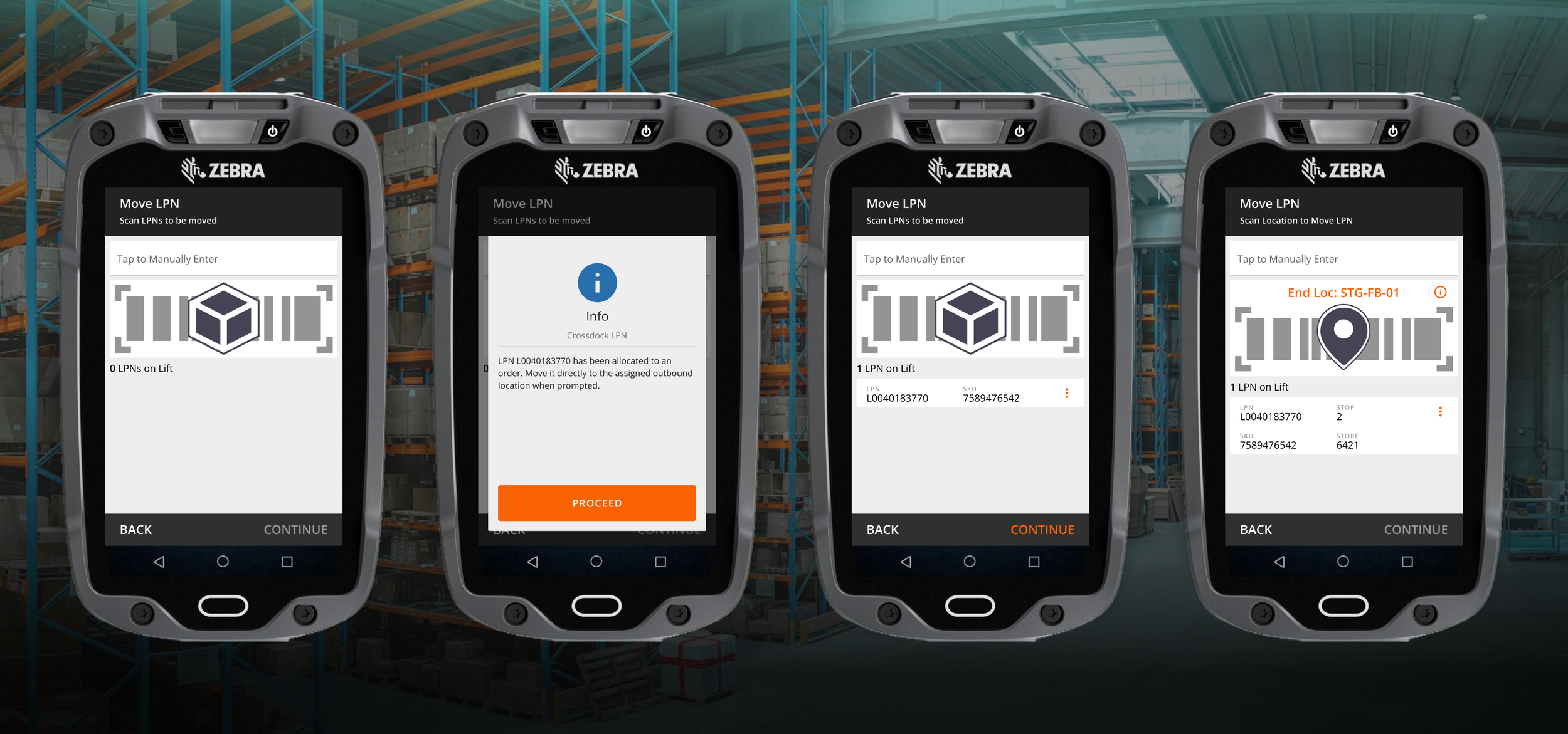
Operations weren’t running as efficiently as they could be — teams were forced to store pallets in locations before being picked for orders. Flowing pallets directly to outbound when the same product is received & shipped the same day would capture $1.2M Annual Labor Savings by eliminating redundant work tasks. This is referred to as “cross-docking” in warehousing, a standard practice that minimizes storage time and helps goods reach final destinations much faster.
Problem: money on the table
-
Device UI changes must be incorporated into existing Putaway flow
Inform users when a cross-dock occurs
Any desktop visibility must be incorporated into existing Tasking dashboards
Cross-dock trigger dependent on backend processes owned by other feature teams
-
General Warehouse Associates
Device users responsible for moving pallets
Operations Managers & Supervisors
Desktop users responsible for labor tracking and operational oversight
49+ Distribution Centers
Stocking DC’s replenish general merchandise to stores across the USA
Flatbed DC’s supply big & bulky materials to stores and customers across the USA
-
Co-design workshops with Product, Engineering, and SMEs
Service Blueprinting
Hi-Fidelity Prototyping
Peer Group Design Critique
Usability Testing & Qualitative Feedback Sessions (Remote Moderated)
Field Research - Observation & Contextual Inquiry
User Journey Mapping with Gap Analysis
-
This project supported an Enterprise Warehouse Management System (WMS) used by internal Home Depot associates across 3 distinct distribution platforms (~9000 Monthly Active Users).
WMS Explained:
Software that tracks & optimizes the flow of goods within a warehouse
Features span receiving, inventory tracking, order fulfillment, and more
Supports directed tasking flows to guide users through daily operations
Product Goals:
Expand supply chain capabilities to maximize delivery speeds while minimizing operating costs
Reduce overhead costs from using 3rd party WMS solutions
Deliver a best-in-class experience for distribution center associates
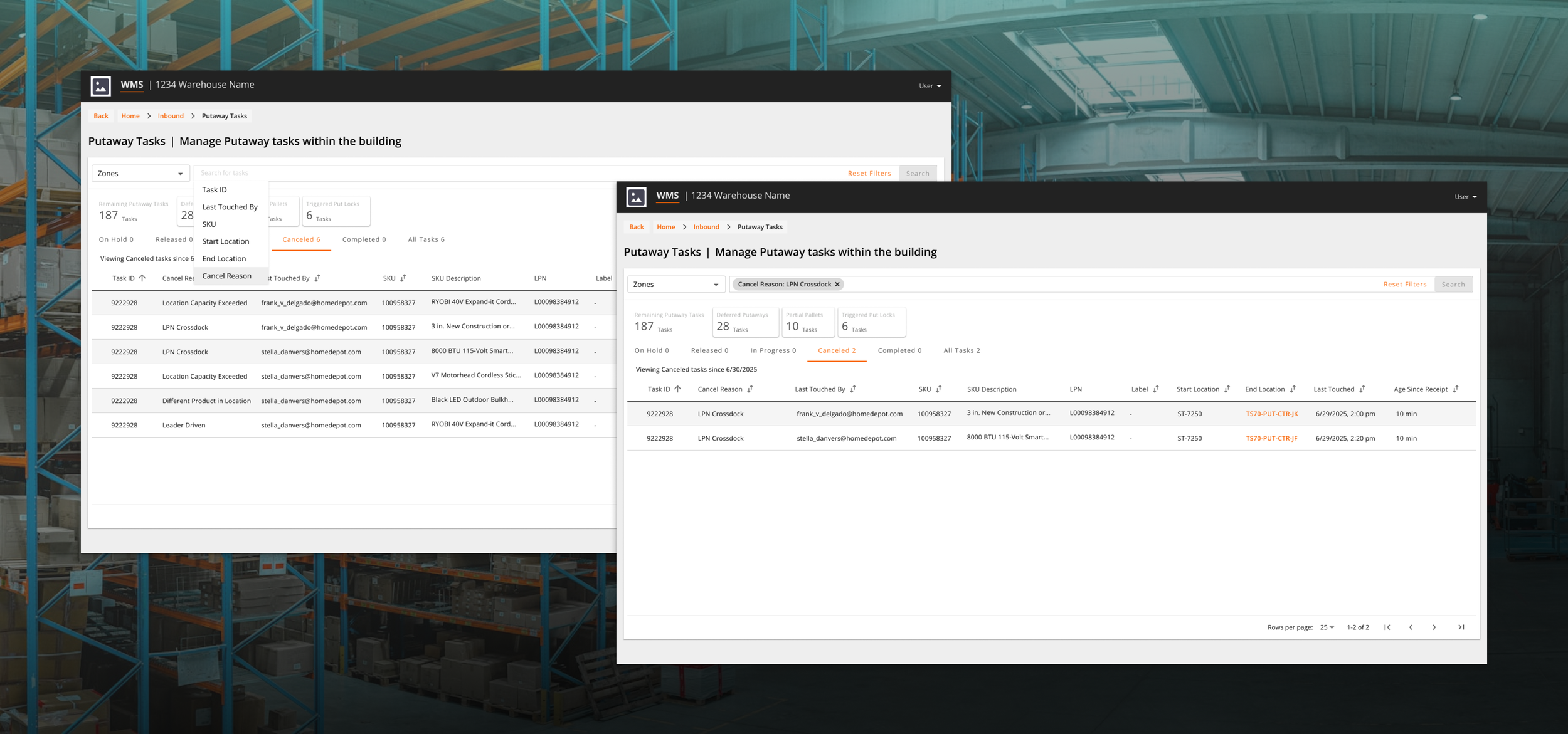
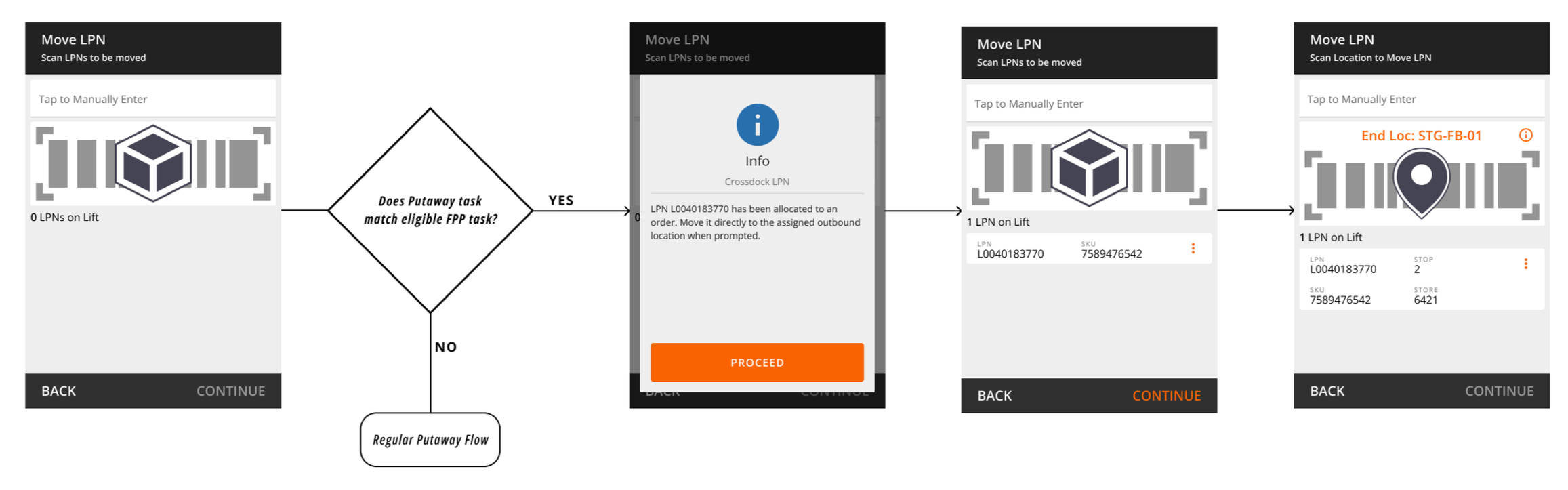
The final experience automatically detects cross-dock opportunities upon pallet scan and directs associates to carry out moves, with minimal desktop visibility for Supervisors/Operations Managers. In the event of an opportunity, users receive an overlay message explaining the change and are directed to pallet staging locations while backend services cancel redundant systemic tasks. If the pallet doesn’t have a specific assigned location, a new warning message directs users to general staging for easy drop-off.
Solution: seamless Callout & Redirect
Targeted context resolves user confusion recorded during pilot
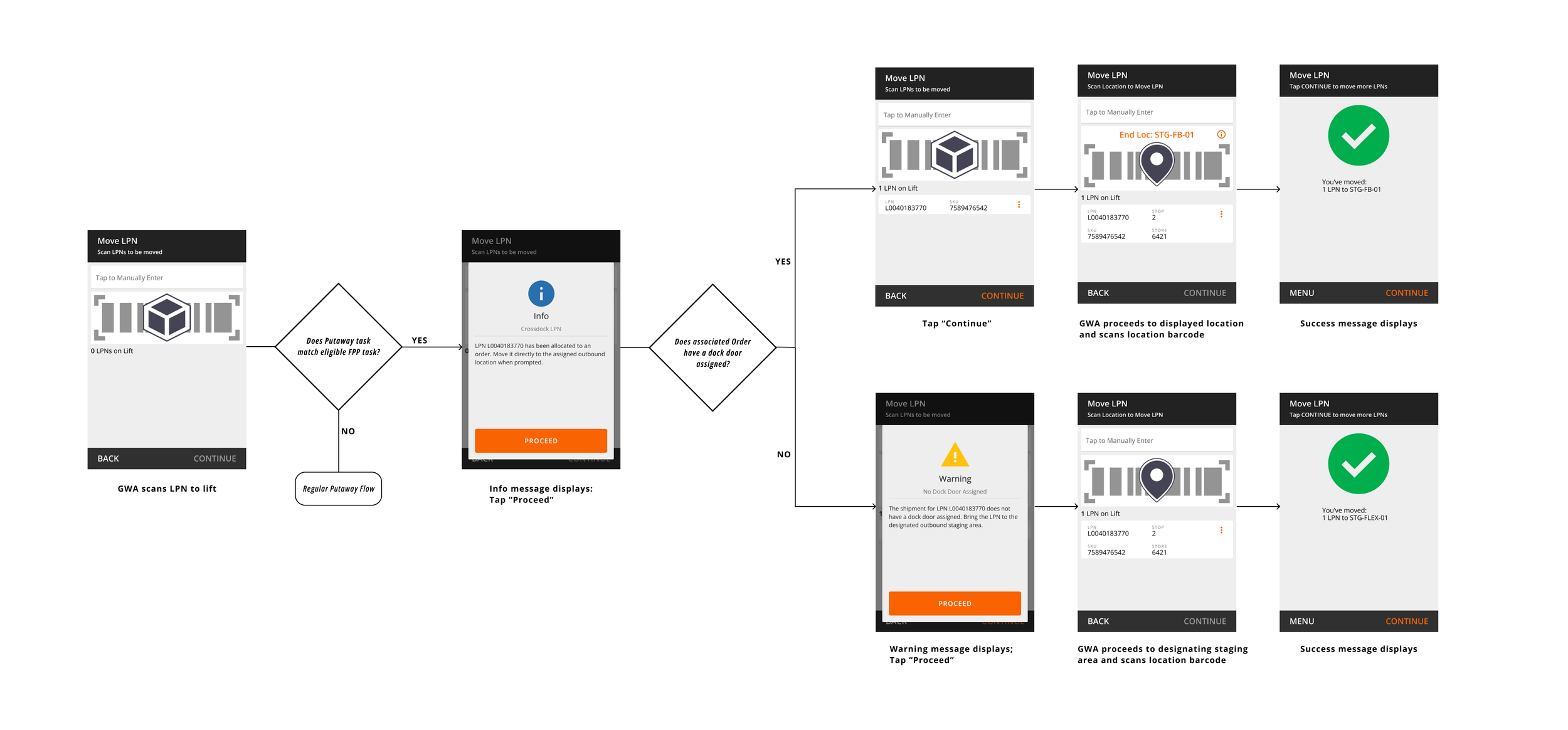
Searchable cancel reasons enable leaders to track cross-dock activity
Due to a missed requirement in the technical implementation, getting the flow to work as intended needed manual cross-department coordination to line up opportunities. Early pilot feedback indicated the flow was easy to follow under these optimal conditions, but confusing otherwise.
Despite friction in feature implementation, the pilots recorded labor savings of ~10 minutes per pallet in Stocking DC’s, and ~45 seconds per pallet in Flatbed DC’s compared to prior processes. These time savings were a stunning proof of concept towards the projected $1.2M Annual Labor Savings.
Operational feedback on how to maximize outcomes focused on increasing proactive desktop visibility to better direct labor for opportunities, while key device pain points were resolved prior to wider feature release.
Value Drivers
Reduction in total touches required from receipt to shipping
Eliminates 2 labor tasks per cross-docked pallet
Increased outbound CPH via more picking tasks completed per shift
Descriptive UI alerts provide necessary context to help associates adapt to new workflows
Results: Zero to Hero
Challenges: Design paralysis & Missing documentation
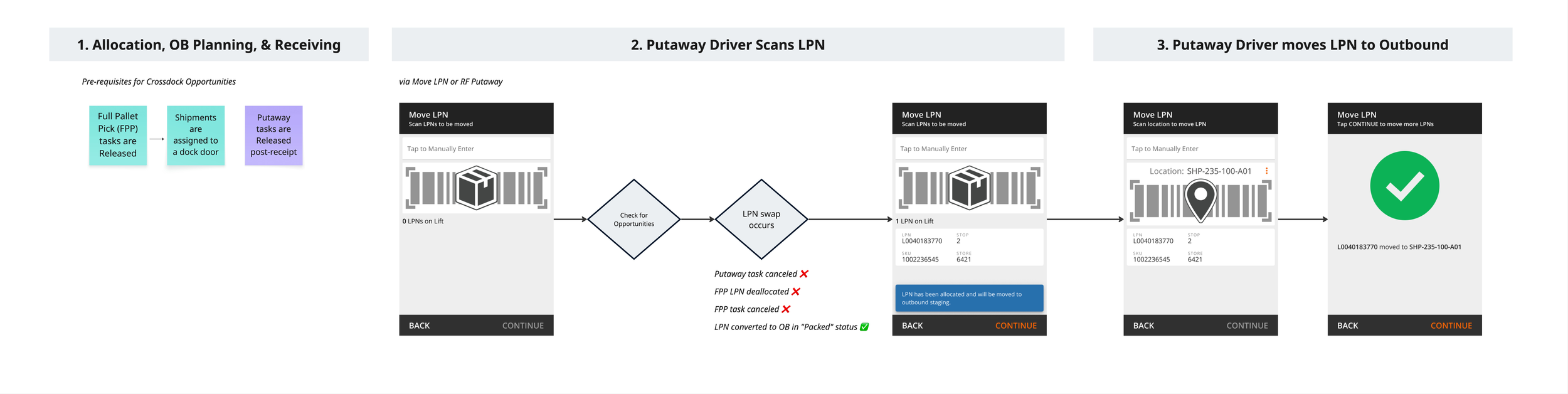
After a months long pause with no prior documentation, at the start of the project every decision had to be rehashed. Without any design documentation or user insights left from my predecessor, I needed the technical requirements solidified to avoid potential UX rework. I partnered with Engineering to draft a Service Blueprint to bring structure to cross-team design sessions through a shared source of truth.
The feature married flows from 3 different teams with oversight from Principal Engineering

Clarified Requirements:
Users can’t opt out once an opportunity is identified, securing intended business objectives
Cross-dock moves don’t have systemic tasks associated, avoiding excessive architecture work
Orders must have a dock door assigned to be eligible, ensuring the system has a location to direct users to
A new info snackbar provides helpful context without being intrusive or interrupting workflow
Key Feedback from User Testing (2 Supply Chain Directors & 5 DC Teams):
The notification concept was understood, but temporary callouts could be easily missed during repetitive scanning workflows
Praise for eligibility rules that would avoid unnecessary bottlenecks
Requests for proactive visibility to opportunities rather than point of scan (out of scope)
An overlay adds intentional friction until future component changes enable persistent UI indicators
An explicit technical requirement designed to prevent the system from cross-docking pallets too far in advance was not built — the team responsible had quietly pivoted to shave a few days off development; “if they’re following SOP, it shouldn’t be needed.”
Assumptions about how users work opened the experience up to error scenarios that I never designed for, and we ran into issues during QA testing. With stakeholder approval, my PM decided not to delay the pilot despite risks of not hitting our intended outcomes.
A curveball threatens Derailment
Associates at our pilot building were not following SOPs, resulting in broken flows where the system had no specific location to direct users to. Users were left confused about what to do, leading to time consuming troubleshooting as they sought help from Supervisors. A DC Engineer on-site summed it up best:“If the associate doesn’t know where to bring the pallet, we lose the benefit. It actually creates more labor.”
User confusion & Experience Gaps
I mapped out pain points between expectations & reality to prioritize UX fixes
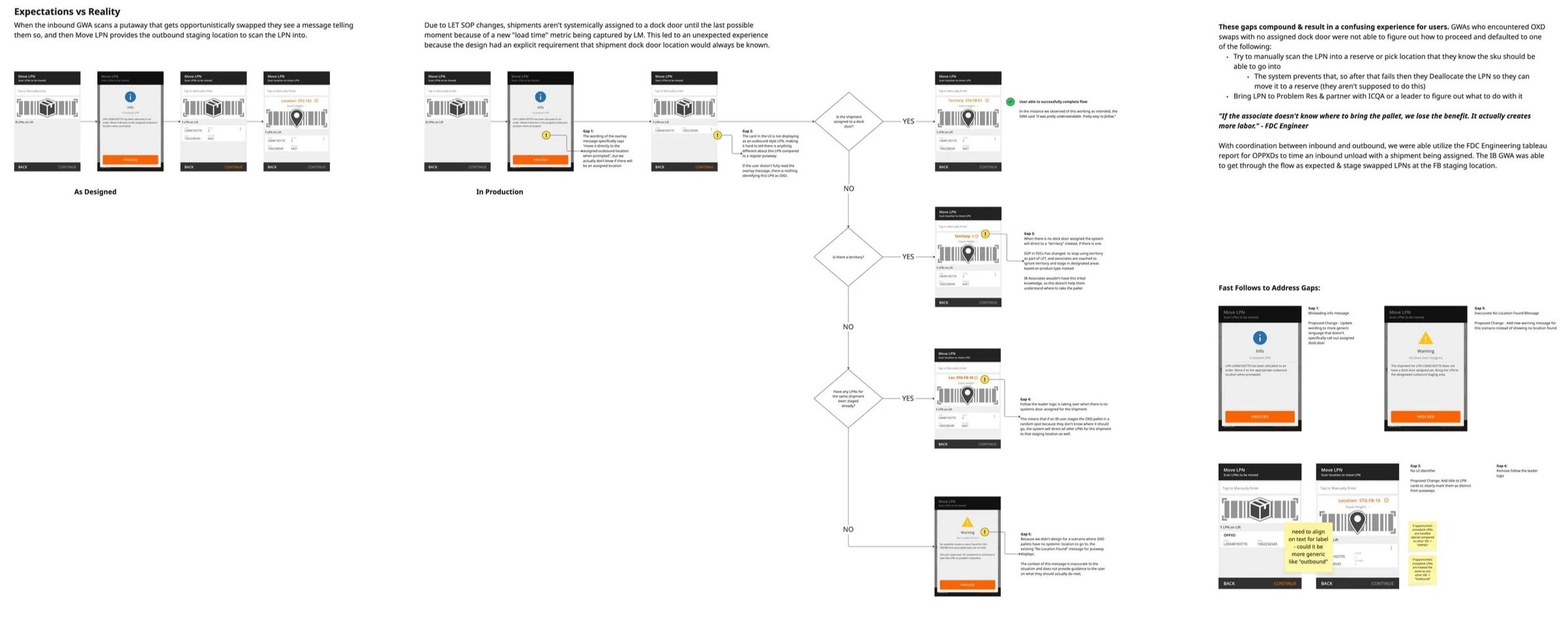
Working with DC Engineering & Operations to coordinate inbound & outbound work, we started seeing successful cross-docks
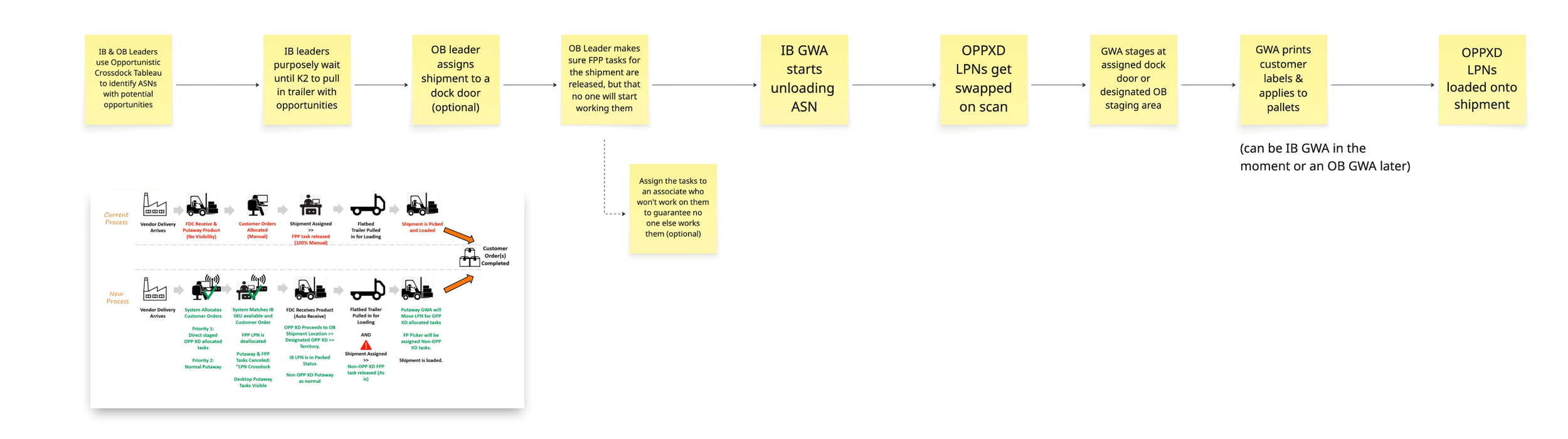
UX still needed to solve for what happens when there is no system-directed location to replace the generic “No Location Found” UI message that was being displayed. Frequency of cross-docks was low, and we realized that if we implemented the missing backend requirement as originally intended we would effectively slash opportunities to zero.
I designed a new overlay to provide better context, replacing the old message with more explanatory text refined through on-site collaboration with users. This design wouldn’t limit potential returns, wasn’t reliant on another feature team, and could be developed quickly before piloting at a second site.
Conclusion
Despite due diligence in UX research — validating proposed changes with 15+ Operations stakeholders and authoring a Service Blueprint that all dependent feature teams signed off on — one rogue backend change upended the entire design.
Running a smooth pilot with no issues is good for your professional reputation, but I learned that messy ones can also be considered a success. Show-stopping issues are caught with minimal impact to the business, and diverse perspectives come together to push solutions more rapidly than the typical Enterprise production cycle.
When launching a new feature, embrace the possibility that you might have gotten it wrong and be ready to adapt.