
Putaway Skip Location
Fixing legacy bottlenecks through modernized exceptions visibility

Enterprise UX | Supply Chain
May- July 2025
Overview
My Role - Lead UX Designer (Inventory Movement Team)
Objective
Unblock a major architectural upgrade for warehousing Putaway functionality by giving associates a fast, reliable way to skip unusable locations while creating the visibility needed to resolve problems and keep inbound work flowing.
What Happened
I led discovery research to surface risk early, prototyped device & desktop flows, and tested designs with key stakeholders prior to final handoff. When competing user needs stalled progress, I aligned teams around an MVP that balanced speed and delivery effort and ran a smooth pilot.
Business Impact
📈 $312k Annual Labor Savings through improved task sequencing and WIP visibility (projected)
🚀 High 87.5 Usability Score (UMUX-L) captured from pilot participants after 2 days of use
⏳ Reduced Research Time through improved visibility and fewer recurring issues over time
Team
PM, IT Lead, +4 Engineers
2 Dependent Internal Teams
DC Engineering & Stakeholders
Devices
Zebra TC8300 / Zebra MC9400
Web
Key Skills
UX Research & Design
Service Design
Prototyping & Testing
Cross-Functional Collaboration
Tools
Figma
Miro
Storybook
CoPilot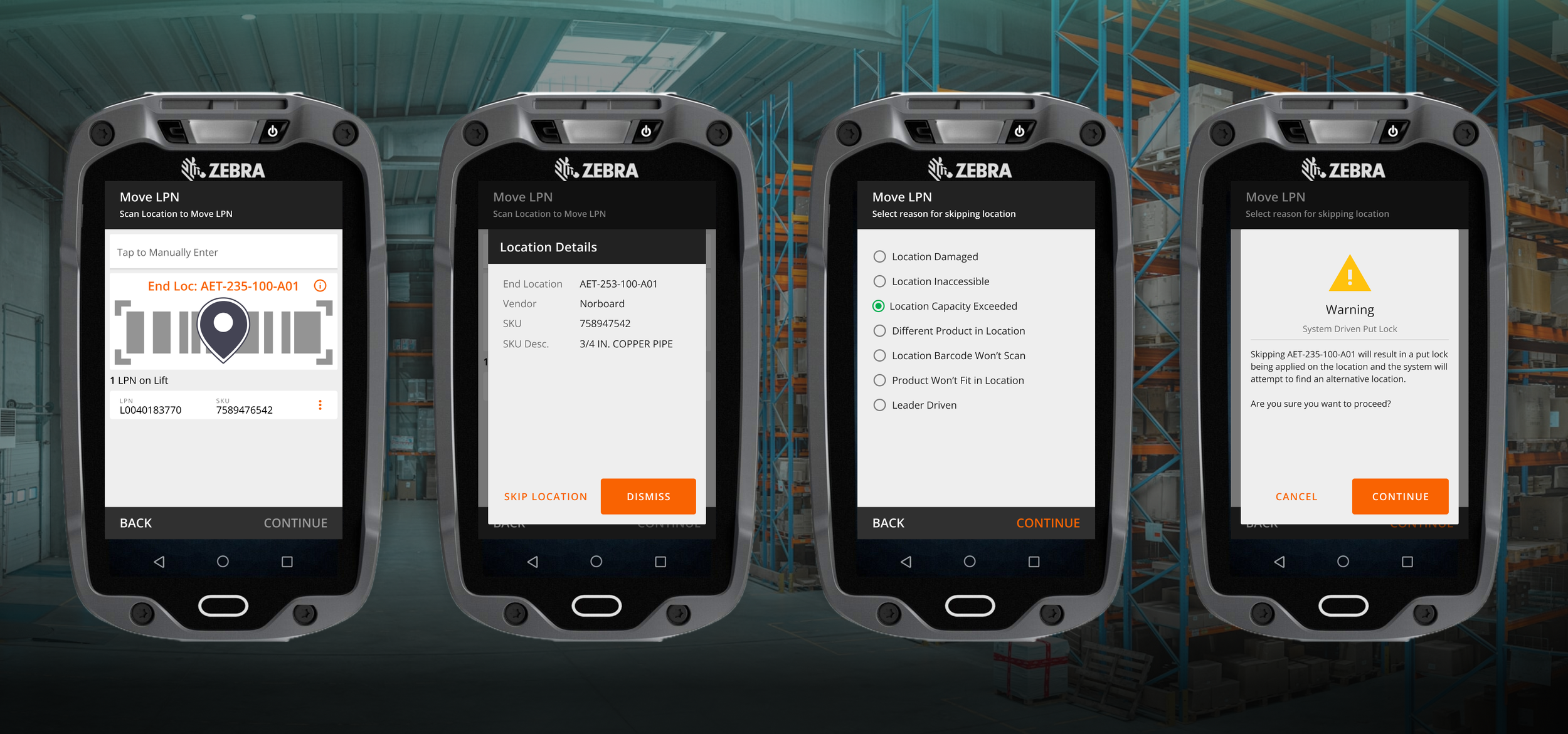
Problem: Missing functionality, Stalled Rollout
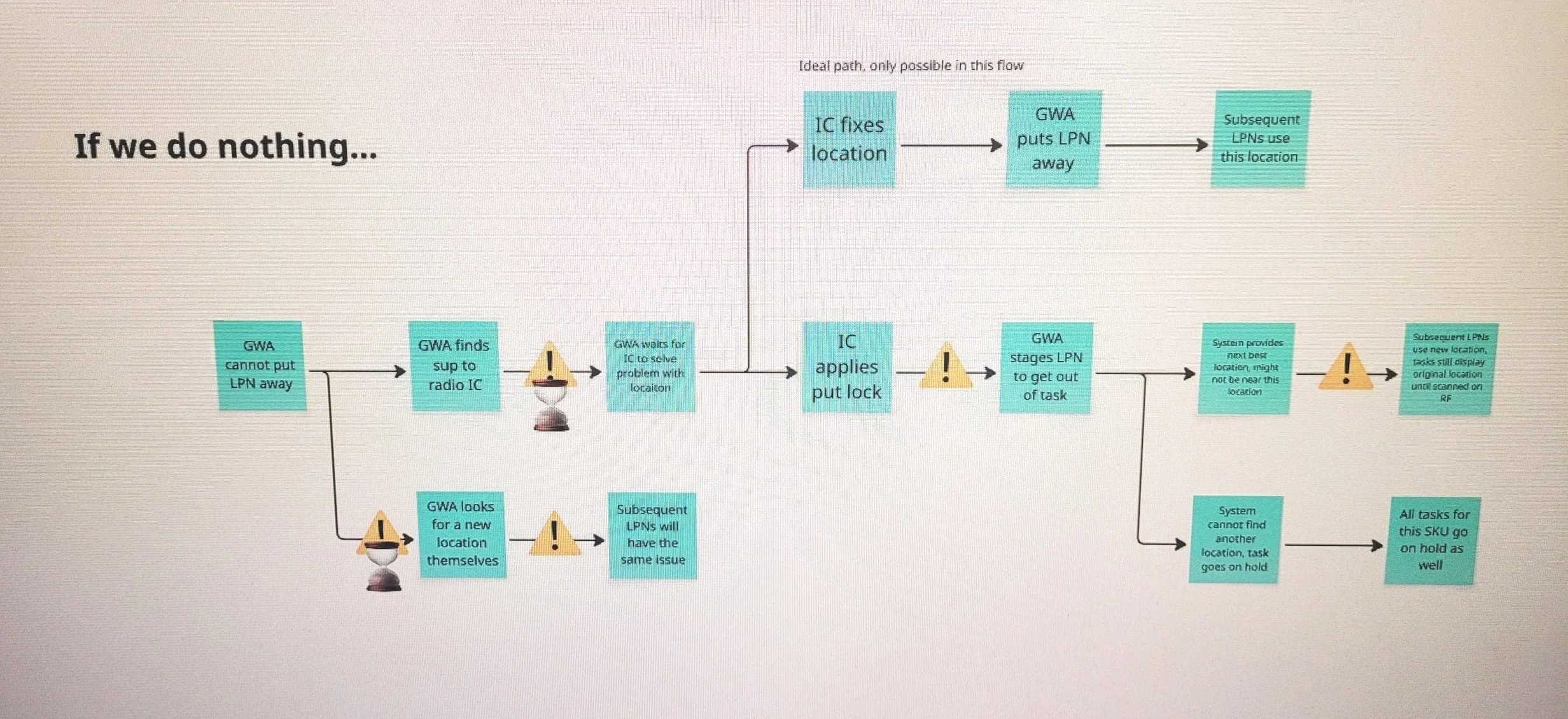
A team I just joined was piloting architectural upgrades for Putaway, the process which handles moving freight into storage locations, to prepare for future capability expansions on the product roadmap. A key exceptions flow for skipping unusable locations was mis-categorized a a “nice to have” and left out of the new version because it often sent users back to the same locations repeatedly, resulting in snowballing consequences:
⚠️ Significant delays for both Inbound and Inventory Control departments (manual resolution can exceed 20 minutes)
⚠️ Exacerbated inventory capacity issues from Putaway drivers using random empty locations
⚠️ The pilot was cut short and feature rollout put on hold
-
Allow users to skip unusable locations within the putaway flow & the system immediately suggests an alternative
Prevent sending users back to previously skipped locations
Include a mechanism for the system to know when locations are ready to use for putaway again
Solution must work for 2 different DC platforms with unique needs & use cases
-
General Warehouse Associates
Device users responsible for moving pallets
Operations Managers & Supervisors
Desktop users responsible for labor tracking and operational oversight
49+ Distribution Centers
Stocking DC’s replenish general merchandise to stores across the USA
Flatbed DC’s supply big & bulky materials to stores and customers across the USA
-
Co-design workshops with Product, Engineering, and SMEs
Qualitative User Interviews (Field & Remote)
Field Research - Observation & Contextual Inquiry
Affinity Mapping & Research Synthesis
Iterative Prototyping (Mid to Hi Fidelity)
Peer Group Design Critiques
Stakeholder Feedback Sessions (Remote)
User Acceptance Testing & Usability Feedback Surveys (UMUX-L)
-
This project supported an Enterprise Warehouse Management System (WMS) used by internal Home Depot associates across 3 distinct distribution platforms (~9000 Monthly Active Users).
WMS Explained:
Software that tracks & optimizes the flow of goods within a warehouse
Features span receiving, inventory tracking, order fulfillment, and more
Supports directed tasking flows to guide users through daily operations
Product Goals:
Expand supply chain capabilities to maximize delivery speeds while minimizing operating costs
Reduce overhead costs from using 3rd party WMS solutions
Deliver a best-in-class experience for distribution center associates
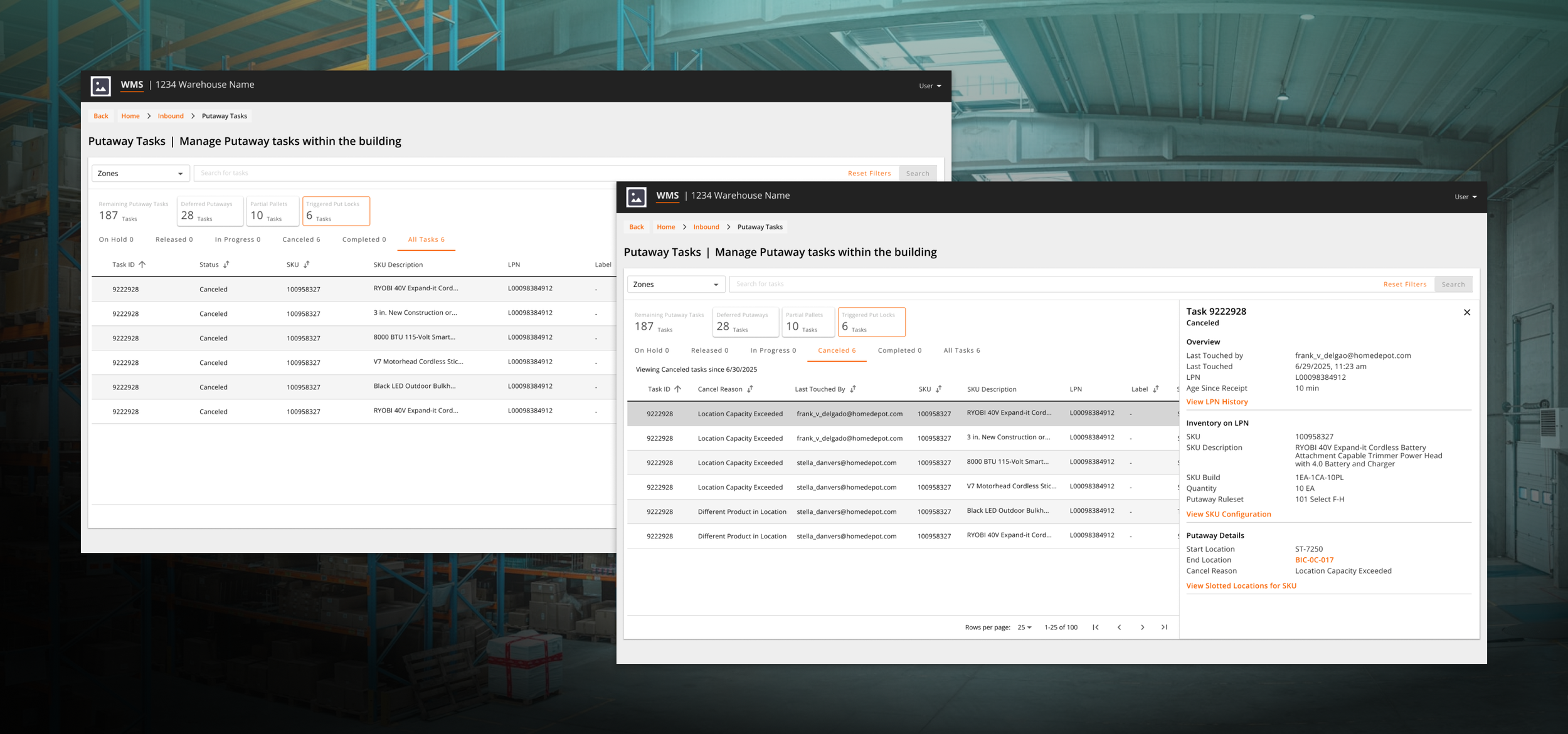
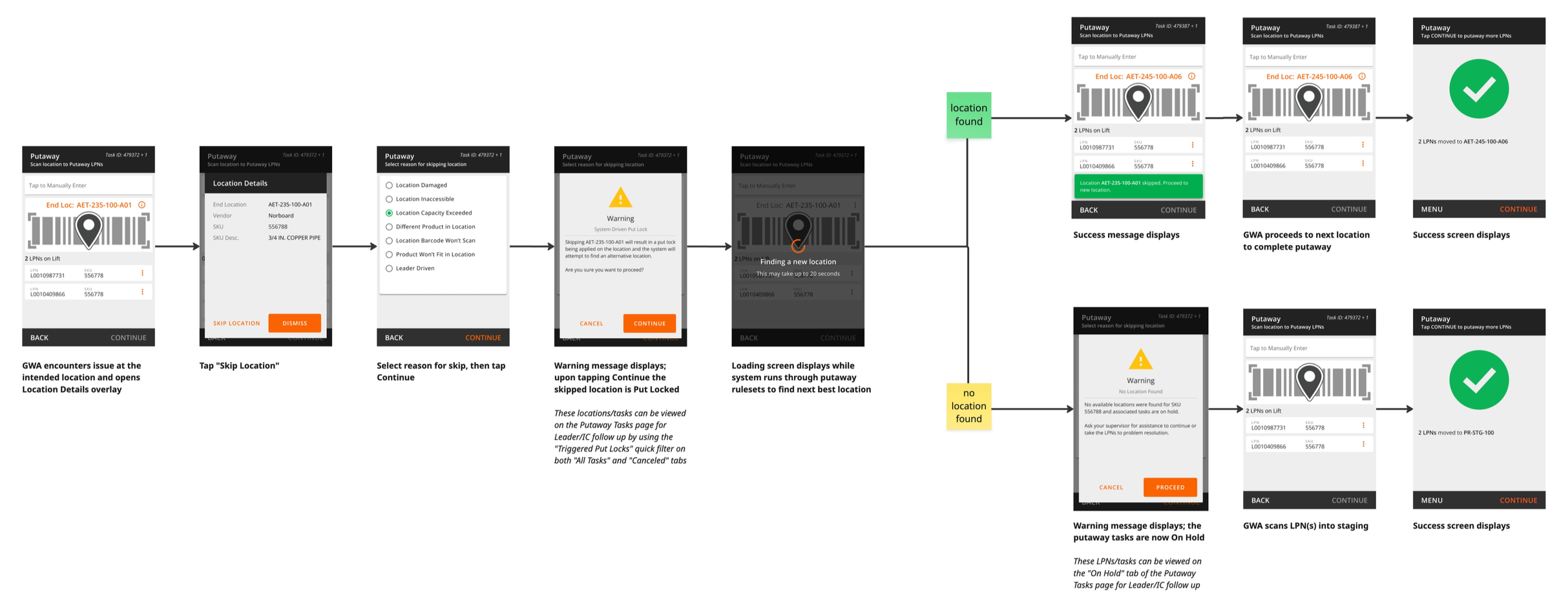
The final experience for handling problem locations starts on mobile where users initiate a skip, indicate the reason why, and the system finds a new location to allow continued work without delays. The backend automatically locks unusable locations, preventing time-wasting repeated skips and materializing as visibility on the Putaway Tasking dashboard via a new “Triggered Put Locks” filter tile allowing Supervisors and IC teams to quickly scan for occurrences and drill down to relevant timestamps, skip reason codes, and detailed task data to expedite research.
Solution: Skip once, fix once
Immediate resolutions for Putaway drivers relieves pressure on ICQA to fix problems in the moment
Research-backed data visibility expedites problem solving for complex workflows
After 2 days piloting at a high volume DC, the feature earned a high usability rating of 87.5/100 (UMUX-L*) — with users citing the fact that they aren’t repeatedly sent back to bad locations as a key efficiency driver. Following the successful pilot we gained approval to complete the full rollout of Putaway Tasking, converting all remaining DC’s over the next two months ($312k Annual Labor Savings).
Operational feedback identified opportunities to improve the experience further through real time alerts, adaptive recalculation logic, and additional put lock triggers. Leaders were generally excited by the new visibility to Putaway WIP brought by the upgrade.
Value Drivers:
Descriptive reason codes and new data fields provide clear context to aid problem resolution
Potential indicator: # of “indirect labor” hours spent fixing bad putaway locations compared to prior process
System-driven Put locks prevent repeated bad location suggestions, saving time & improving flow
Real-time visibility to skips helps supervisors follow up quickly and encourages better compliance from associates
*UMUX-L: Usability Metric for User Experience “Lite”, a 2 question survey that measures perceived usability of a product/feature
Results: efficiency for competing user segments
Challenges: Opposing needs & stakeholders at odds
As the “cheapest” technical approach, IT proposed automatically applying a put lock to a location when a user skips it, a systemic configuration setting used to block any inventory from being moved in. This would leverage existing logic to prevent the system from directing users to a skipped location, but in current state these locks were manually controlled by specially trained users – there was no such thing as a system-applied put lock. We needed to understand the risks & potential impacts to Inventory Control Quality Assurance (ICQA) operations before we could proceed.
Key Feedback from Discovery Interviews (5 DC teams):
⚠️ System-applied put locks were likely to increase workloads for ICQA associates
⚠️ This solution would require dedicated visibility for users to effectively manage (not in scope)
⚠️ Sentiment fell strongly against the idea, which could impact user adoption
My PM wanted to risk the put lock solution anyway and broadened design scope to include desktop visibility improvements. Short term inconvenience felt like a worthy tradeoff to long term inventory accuracy gains through forcing teams to address problems.
Lack of a system-directed option encourages time consuming workarounds
Device decisions about reason codes, recalculation logic, and lock behavior impact visibility options for desktop users
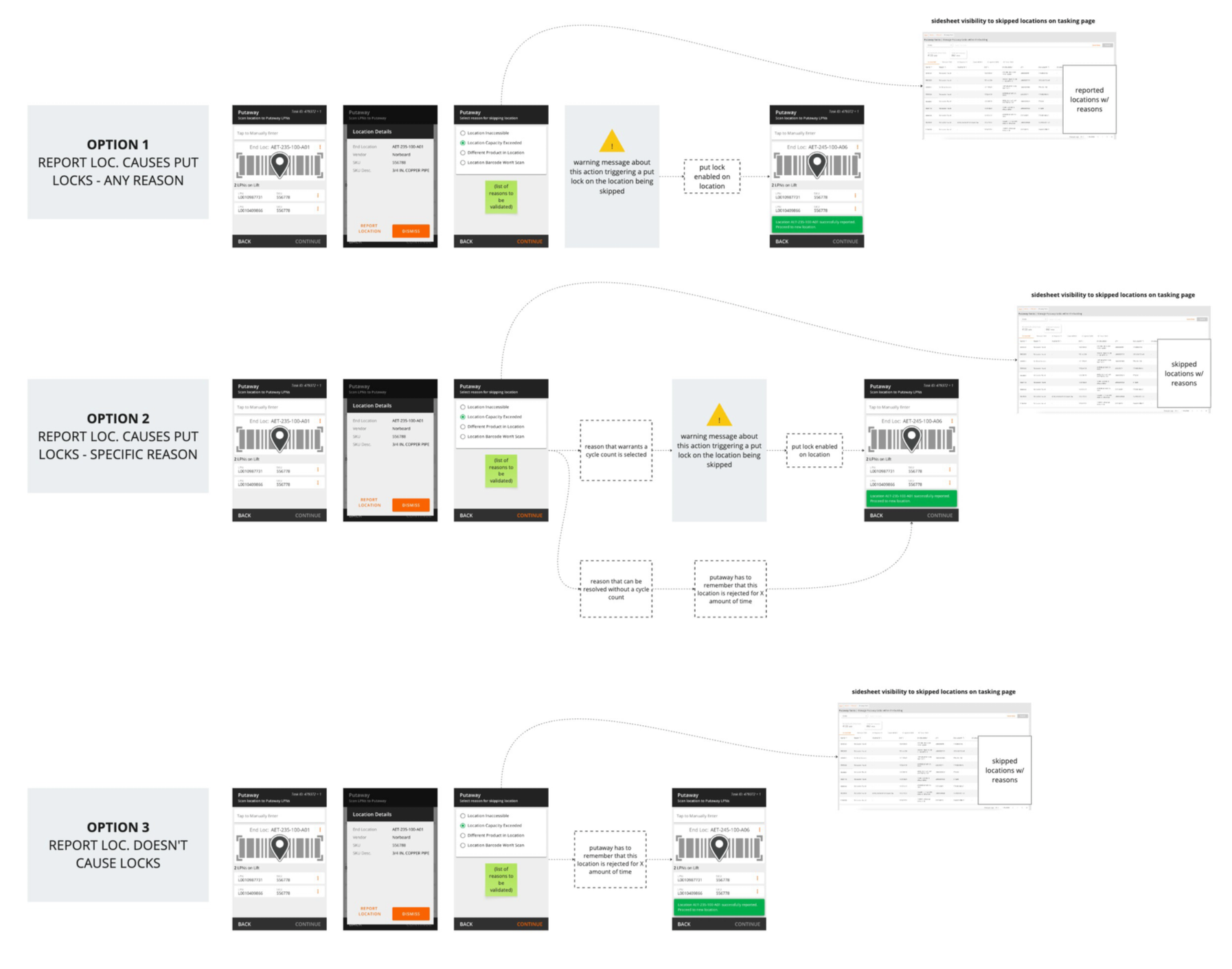
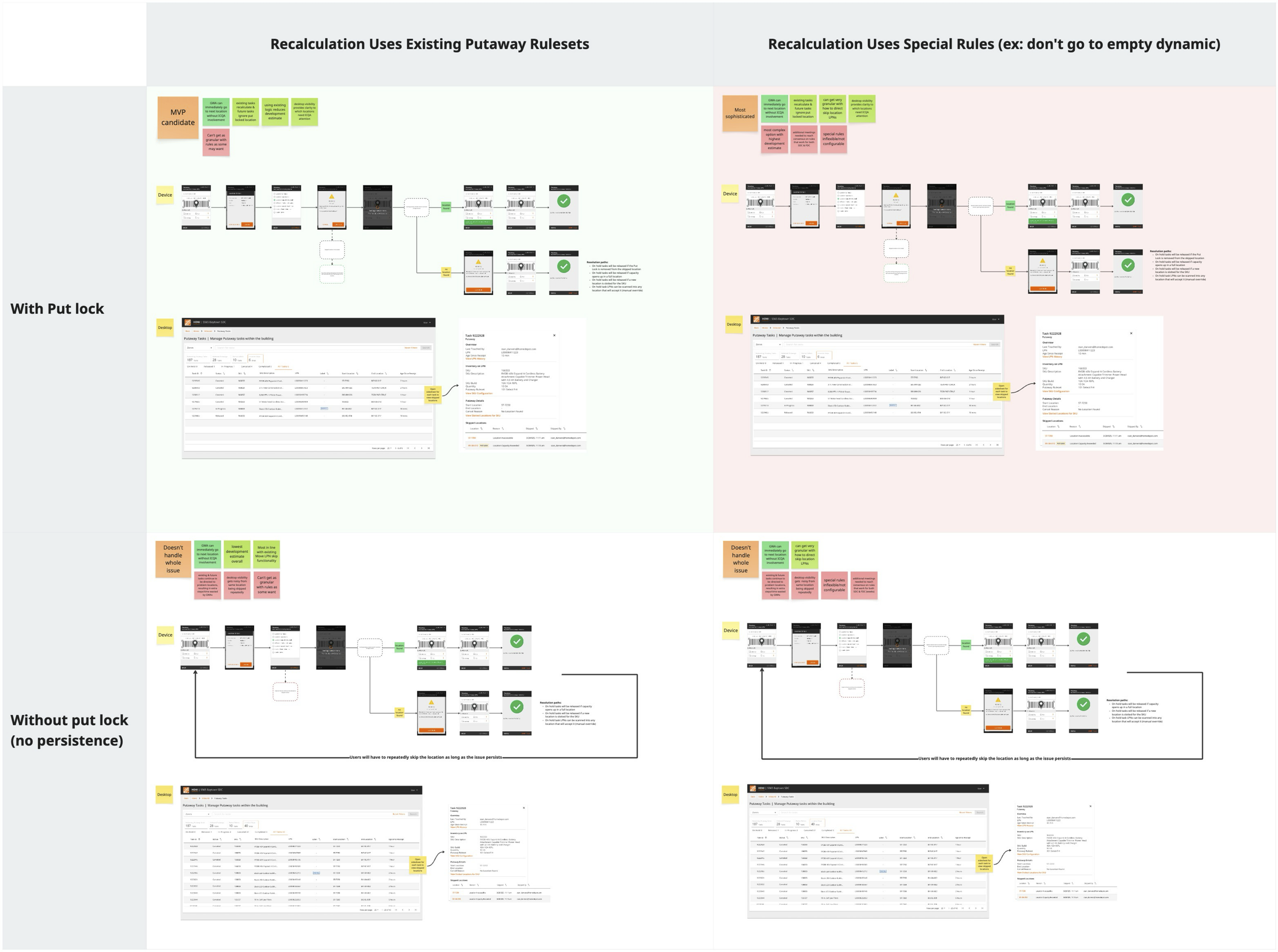
The solution needed to work for 2 DC platforms with unique use cases and those stakeholder groups had conflicting opinions about technical design, delaying consensus. Dynamic rulesets about how the system should select new locations after a skip had scope creeping implications. I mapped out the tradeoffs of each option to provide better context during our cross-team collaborations and reach alignment — highlighting how specialty solutions would exponentially increase delivery times without noticeable benefit to the user experience.
Presenting this breakdown, stakeholders from both groups agreed to the MVP implementation — with caveats about the desktop UI. They felt burying skip data in a drawer was not accessible enough for ICQA users who would be visiting that page expressly for put lock research.
Breaking the deadlock
The version with the lowest development estimate became MVP over granular customizations
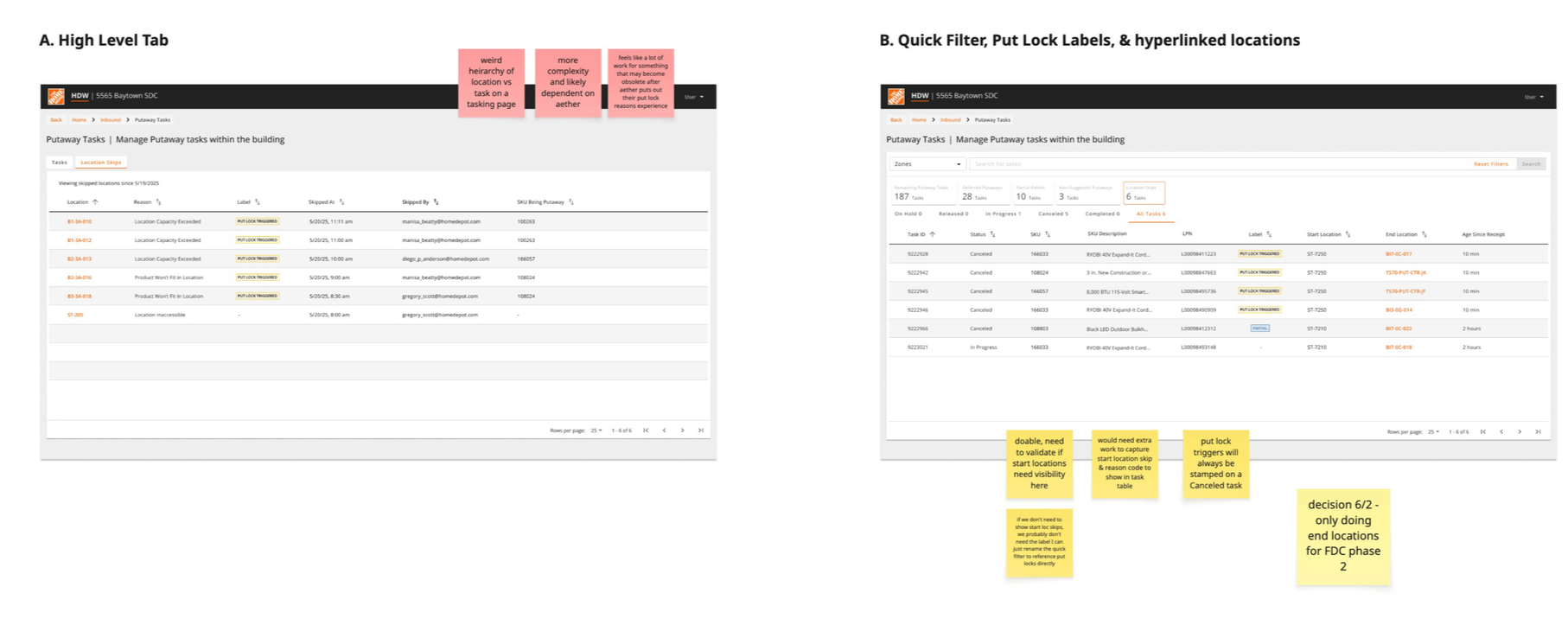
Modifying the task-based desktop page to meet these requirements was tricky:
✅ A list of put locked (skipped) locations
✅ The reason locations were skipped
✅ Users name who triggered the put lock (in case follow up with associate is needed)
I iterated two versions of table based visibility incorporating data points essential to ICQA lock resolution process; an tab view listing locations with data fields as columns, and a more cluttered approach adding new filters, labels, and hyperlinks to the existing screen. The work-list design met the brief perfectly, but partners raised concerns that it disrupted the primary use case of the page as a inbound monitoring tool.
The idea worked better as a standalone page, which was out of scope, plus ownership of ICQA pages fell to a different internal team which had a similar experience in their backlog. Rather than deliver a solution that would be made redundant by future work, we chose the second design. Though more visually disorganized than the other sketch, it met the requirements and could be built quickly.
SOLVING FOR THE SECONDARY USER
Stakeholders accepted option B after targeted design refinements based on feedback
Conclusion
This is a story about what happens when UX research is skipped. Shipping a major upgrade with missing functionality should never have happened. I was not involved in the decision making that resulted in the stalled rollout I inherited, but we can assume Operations stakeholders were not consulted. Reducing complexity just to meet a deadline can backfire spectacularly when you don’t engage users regularly and communicate product changes. Assumptions are dangerous.
In this case, stakeholders had so many ideas about exceptions handling that it took advanced facilitation strategies to get out of analysis paralysis— essential conversations that should have happened early. Edge case scenarios need to be designed for intentionally, not as an afterthought.