RELEASE TRAILER
Replacing a multi-step, multi-user process with one seamless flow
Enterprise UX | Supply Chain
Sept - Oct 2024
Overview
My Role - Lead UX Designer (Inbound Receiving Team)
Objective
Improve process efficiency of Inbound and Yard operations in warehousing by leveraging cross-app integration to give users a safe, straightforward way to remove empty trailers from dock doors.
What Happened
I led discovery research to clarify user journeys, prototyped device flows, and validated designs with key stakeholders prior to final handoff. When users pushed back on inherent risks, I owned cross-functional design to find a safeguarded solution to drive trust and project success.
Business Impact
⏳ Decreased time on task by 30 seconds per trailer through reduced manual steps (10m saved for every 20 trailers worked)
📉 Reduced risk of errors and safety incidents through physical verification requirements
Team
PM, IT Lead, +2 Engineers
2 Dependent Internal Teams
DC Engineering & Stakeholders
Devices
Zebra TC8300 / Zebra MC9400Key Skills
UX Research
Interaction Design
Prototyping & Testing
Cross-Functional Collaboration
Tools
Figma
Miro
Storybook
CoPilot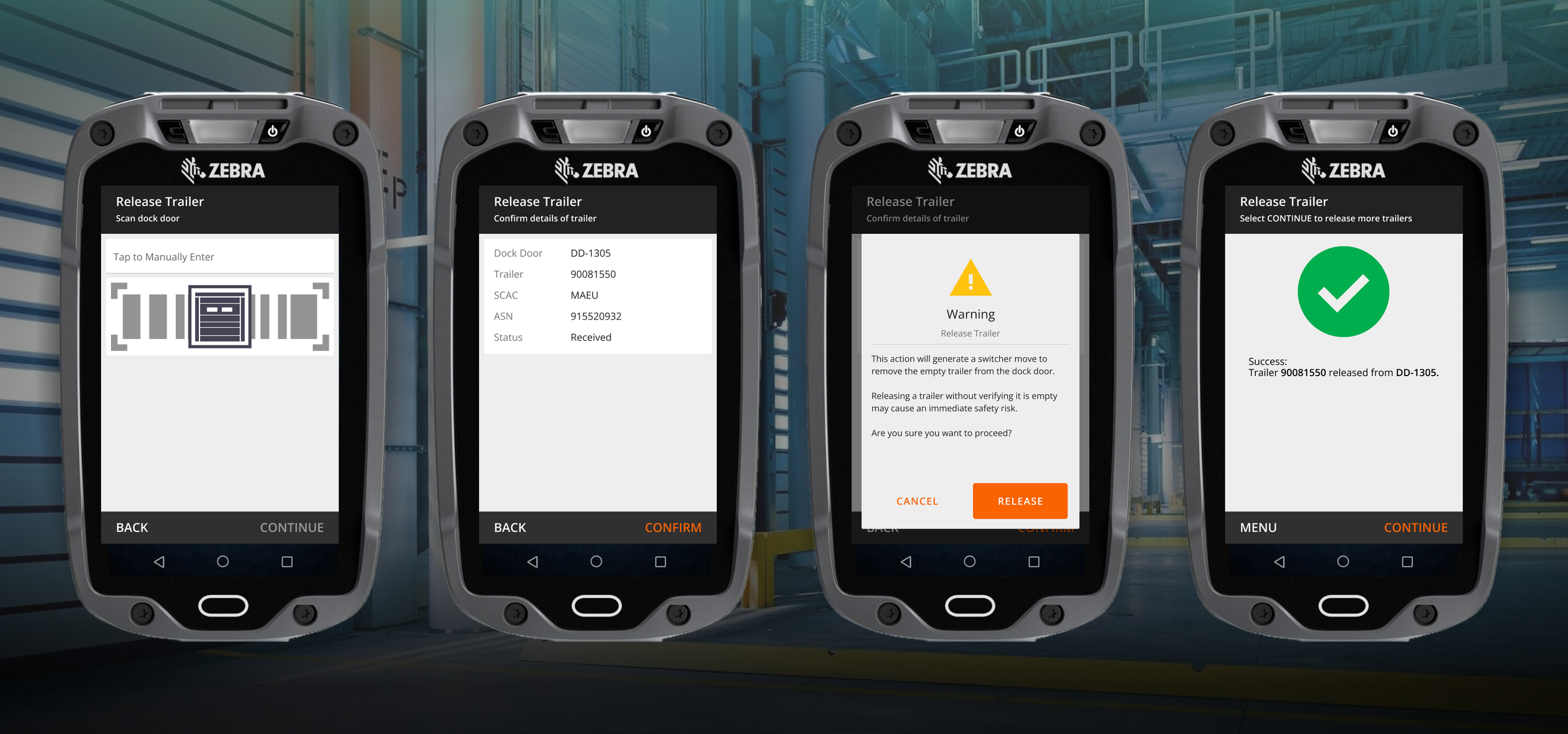
ProbleM: when mistakes cost more than money
Users were dealing with 2 fragmented systems — the Warehouse Management System (WMS) and the Yard Management System (YMS). Actions taken in one needed to be duplicated in the other to synchronize what was happening inside the 4-walls with trailer movements. Like a game of telephone, manual coordination eventually breaks down and leads to operating, tracking, and safety errors. Significant safety risks, delays, and rework made for a lose/lose process; time-consuming at best and fatal at worst.
-
Create a systemic way for 1 WMS user to coordinate empty trailer removal from inbound doors
This action should only be completed after the inbound load is fully received
This action triggers a backend message to the YMS, which then auto-generates a trailer move
Design should be scalable to future phases for outbound trailer moves
-
Operations Managers & Supervisors
Users responsible for operational oversight and executing release trailer actions
12 Stocking Distribution Centers
Stocking DC’s replenish general merchandise to stores across the USA
-
Co-design workshops with Product, Engineering, and SMEs
User Interviews (Remote)
User Journey & Process Mapping
Iterative Prototyping (Hi Fidelity)
Usability Testing & Qualitative Feedback Sessions (Remote Moderated)
-
This project supported an Enterprise Warehouse Management System (WMS) used by internal Home Depot associates across 3 distinct distribution platforms (~9000 Monthly Active Users).
WMS Explained:
Software that tracks & optimizes the flow of goods within a warehouse
Features span receiving, inventory tracking, order fulfillment, and more
Supports directed tasking flows to guide users through daily operations
Product Goals:
Expand supply chain capabilities to maximize delivery speeds while minimizing operating costs
Reduce overhead costs from using 3rd party WMS solutions
Deliver a best-in-class experience for distribution center associates
Solution: from repetitive tasks to one stop shop
The final experience is a standalone, permissions restricted device flow requiring a dock door scan to initiate trailer release. Completing the action triggers cross-app messages to generate trailer moves — allowing for seamless inbound workflow without having to log into YMS manually or rely on word-of-mouth coordination. To prevent unsafe shortcuts, the function is hidden from browser based “device transactions.”
Desktop screens are no longer necessary for this workflow
Impact: moving the needle on labor savings
Priority shifts led to an extended delay before deployment— and Supply Chain operations evolve rapidly so it’s easy for designs to grow stale as operations change. Even so, the pilot recorded time savings of 30 seconds per trailer compared to the legacy process. Scaled across 12 buildings and multiple shifts, 30 seconds adds up quickly in the context of labor hours vs trailers worked. By rooting my design approach in cross-functional collaboration, we shipped a resilient feature that survived a year long development cycle.
Operational feedback mainly concerned opportunities to increase flexibility for inbound exceptions handling within the process.
Value Drivers:
Reduced manual steps diminish manual coordination needs between departments
Streamlined 1-user process boosts operational efficiency
Physical verification requirements improve safety by reducing risk of accidental trailer pullouts
Potential Indicator: # safety incidents before vs. after feature rollout
Challenges: Undefined Journeys & apprehensive stakeholders
A multi-phase WMS/YMS integration effort was already underway so I worked with internal teams to confirm current state flows and extract project requirements from the larger strategy, which had already been defined. This left many open questions about the experience— Who was the primary user? Should it be part of an existing flow, or standalone? Which device(s) will be used? Building features that will rewrite SOP requires strong Operational alignment to nail down people, process, and exceptions.
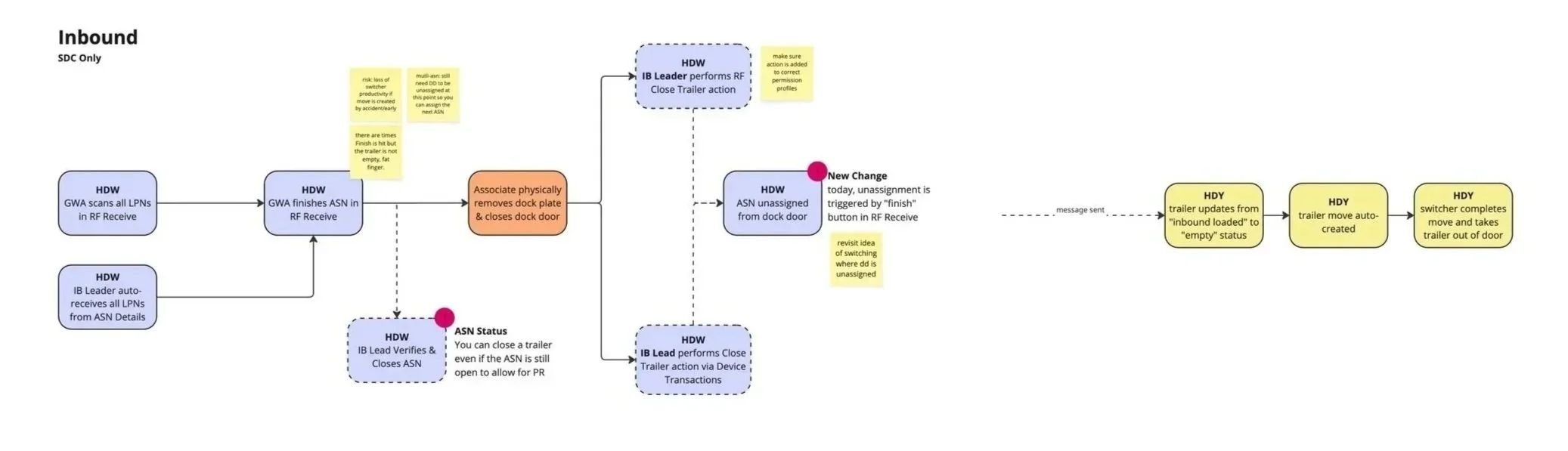
Mapping the touchpoints between users, systems, and manual process
Clarified Requirements from Stakeholders (Logistics Managers & DC Engineers):
✅ Stand-alone function required due to conflicts with user permissions, scalability, and edge cases in the Receiving flow
✅ User access should be restricted to leadership roles only
✅ Mobile flow only, to be completed while physically at the dock door
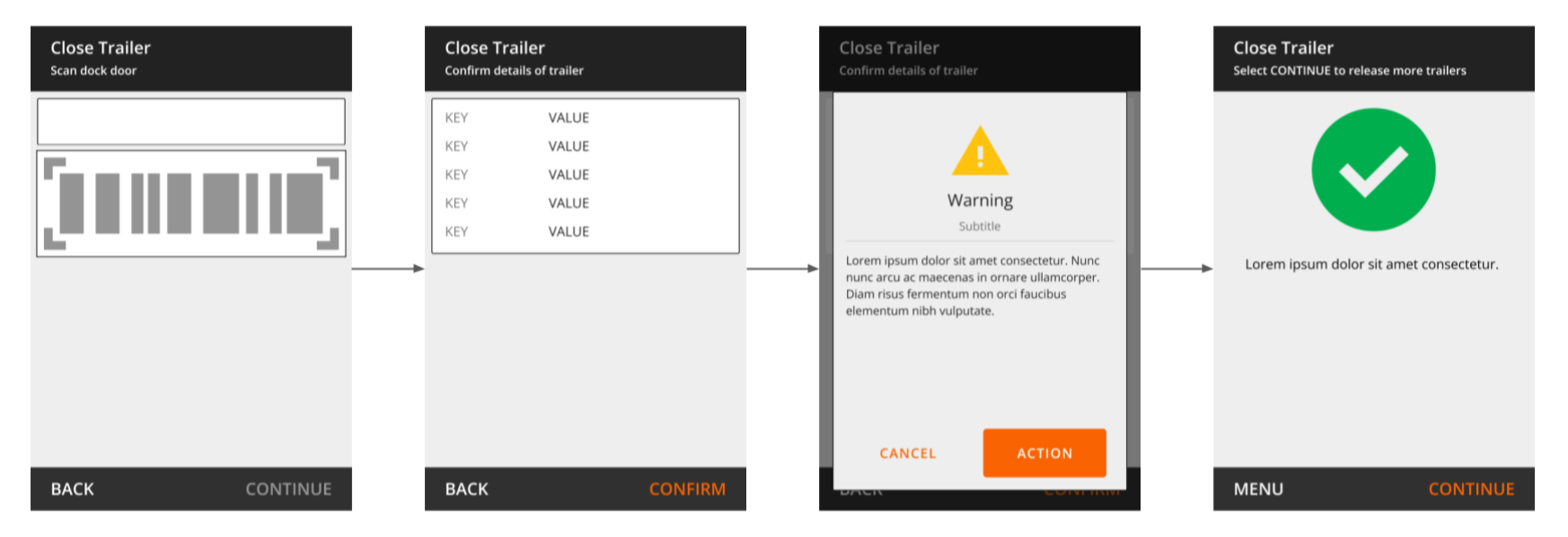
First “Close Trailer” design using the fewest possible steps, with a necessary warning about new impacts
Key Feedback from User Testing (4 DC teams):
⚠️ Terminology Confusion: Users believed “Closing” a trailer = “Closing” the inbound load (an irreversible step), which made them hesitant to complete tasks
⚠️ Exceptions Handling: Limiting the feature to only trailers whose loads are fully received is too restrictive, teams need flexibility to remove empty trailers even if still working problem freight
⚠️ Safety Risk: The warning message felt too subtle, and leaders worried about unsafe shortcuts
We learned of past issues in a different WMS where associates were copy/pasting dock door barcodes from a desk to avoid physically verifying empty trailers before release — leading to critical safety incidents. Our app was open to the same loophole via browser-based device transactions. Extra guardrails were needed to build confidence with stakeholders and safeguard the process. We planned to leave manual options in place as an edge case workaround, so user adoption was also at risk.
trust issues
Renaming the action from “Close Trailer” to “Release Trailer” was an easy vocab fix, and my team supported architecture changes to allow the flexibility needed to process receiving exceptions without creating bottlenecks in the move queue. The issue remaining was how to harden the guardrails. The safest option would be fully blocking the feature from browser access to enforce physical scanning, but I didn’t know if this was possible — It would be a first for the app.
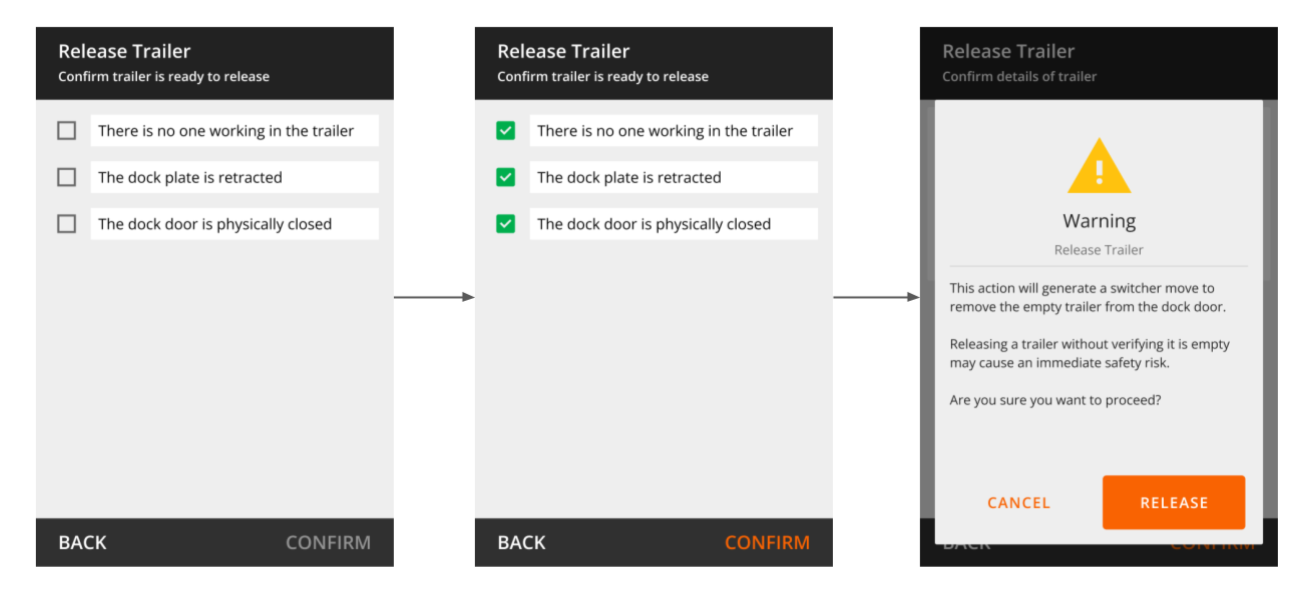
While my PM & Lead Engineer researched technical feasibility, I prototyped and tested a backup option that added a checklist of explicit safety confirmations to the flow. Stakeholders were satisfied; if option A didn’t work option B would suffice. Luckily, we found a technical solution to block browser access and scrapped the checklist from the final design in favor of simplicity.
fool-proofing the system
Intentional friction as a backup option to drive user accountability
Artifacts like personas, journey maps, and prior research findings can make UX Designers over-confident in understanding user needs. When designing for high demand, chaotic work environments, these tools almost never represent the full picture. If on-site contextual inquiry isn’t feasible as a starting point, feedback loops become even more critical to understanding users’ physical reality. In this case, continuous input from operational SMEs enabled feature success by shining a light on blind spots we never anticipated.